GAKI
02 Godot basics
Yannik Brändle - WS25/26
TH Bingen
Vorab:
Neues Angebot der Studienerfolgsberatung
Psychosoziale Beratung
- Frau Silke Kleinschmitt von der Caritas
- Offene Sprechstunde:
- Wann: Mittwochs von 13:30-15:30
- Wo: im Raum 0-110, Stadtgebäude/HHT
- Alternativ per Mail/Telefon
- Genauere infos im OLAT Kurs "Studienerfolgsberatung"
-
Katalog→TH Bingen→Studieneinstieg und
                Support→Studienerfolgsberatung
Projekt GDD
            # Overview
## Game Name
## One-Sentence Pitch (Was ist die Kernidee des Spiels?)
## Genre/Style (Platformer, Puzzle, Simulation, ...)
## Gruppenmitglieder mit Matrikelnummer

# Gameplay Loop
## Player Action (Was macht der Spieler beim Spielen?)
## Goal (Worauf arbeitet der Spieler hin/was muss bzw. will er machen?)
## Win/Loss Conditions (Wann gewinnt oder verliert der Spieler?)

# Aesthetics and Assets
## Sourcen (Woher kommen die Assets? Ein/mehere Asset packs? Selbst machen?)
## Spielperspektive (3D 3rd Person, FPS, 2D Top down, etc.)

# Spiel KI
## AI Systems (welche Systeme werden eingesetzt? FSM, Behaviour Trees, Machine Learning, ...)
## What's hard (welche Hauptprobleme werden hierbei erwartet)
## Godot Addons/Externe Tools (wenn welche genutzt werden sollen)

# Scope & Milestones
## Minimum Viable Product (Was ist das absolute minimum damit das Projekt spielbar ist?)
## Milestones (Was sind die Meilensteine die das Projekt durchlaufen soll?)

# Team & Responsibilities
## Roles (Wer macht was? Macht jeder alles?)
## Collaboration Tools (Welche Projekttools sind geplant? Also Git, Github, Gitlab, Trello, etc.)

# Inspirations
## Similar Games in Concept (Welche Spiele waren die Inspiration für die Idee, bzw welche ähnliche Mechaniken haben)

# Experience level
## Group Member Gamedev Experience (Je Gruppenmitglied: Bereits Erfahrung Mit Gamedev/dem Spielgenre/etc.)
Die Godot Game engine

Godot Geschichte
- 2014: Open source seit 2014
- Januar 2018: Godot 3.0
- März 2023: Godot 4.0
- Gdscript "2.0" kam mit Godot 4
GDScript/C#/...
- GDScript ist die "Hauptsprache", Godot ist aber in C++ implementiert
- C# ist die best unterstützte Sprache neben GDScript
- C# benötigt aber die "Godot .net" Version, da noch nicht via "GD Extension" supported
- diverse andere Sprachen via GD Extension supported
CharacterBody2D default script in GDScript
            extends CharacterBody2D

@export var speed = 400

func get_input():
	var input_direction = Input.get_vector("left", "right", "up", "down")
	velocity = input_direction * speed

func _physics_process(delta):
	get_input()
	move_and_slide()
CharacterBody2D default script in C#
            using Godot;

public partial class Movement : CharacterBody2D
{
    [Export]
    public int Speed { get; set; } = 400;

    public void GetInput()
    {

        Vector2 inputDirection = Input.GetVector("left", "right", "up", "down");
        Velocity = inputDirection * Speed;
    }

    public override void _PhysicsProcess(double delta)
    {
        GetInput();
        MoveAndSlide();
    }
}
Godot Interface Übersicht
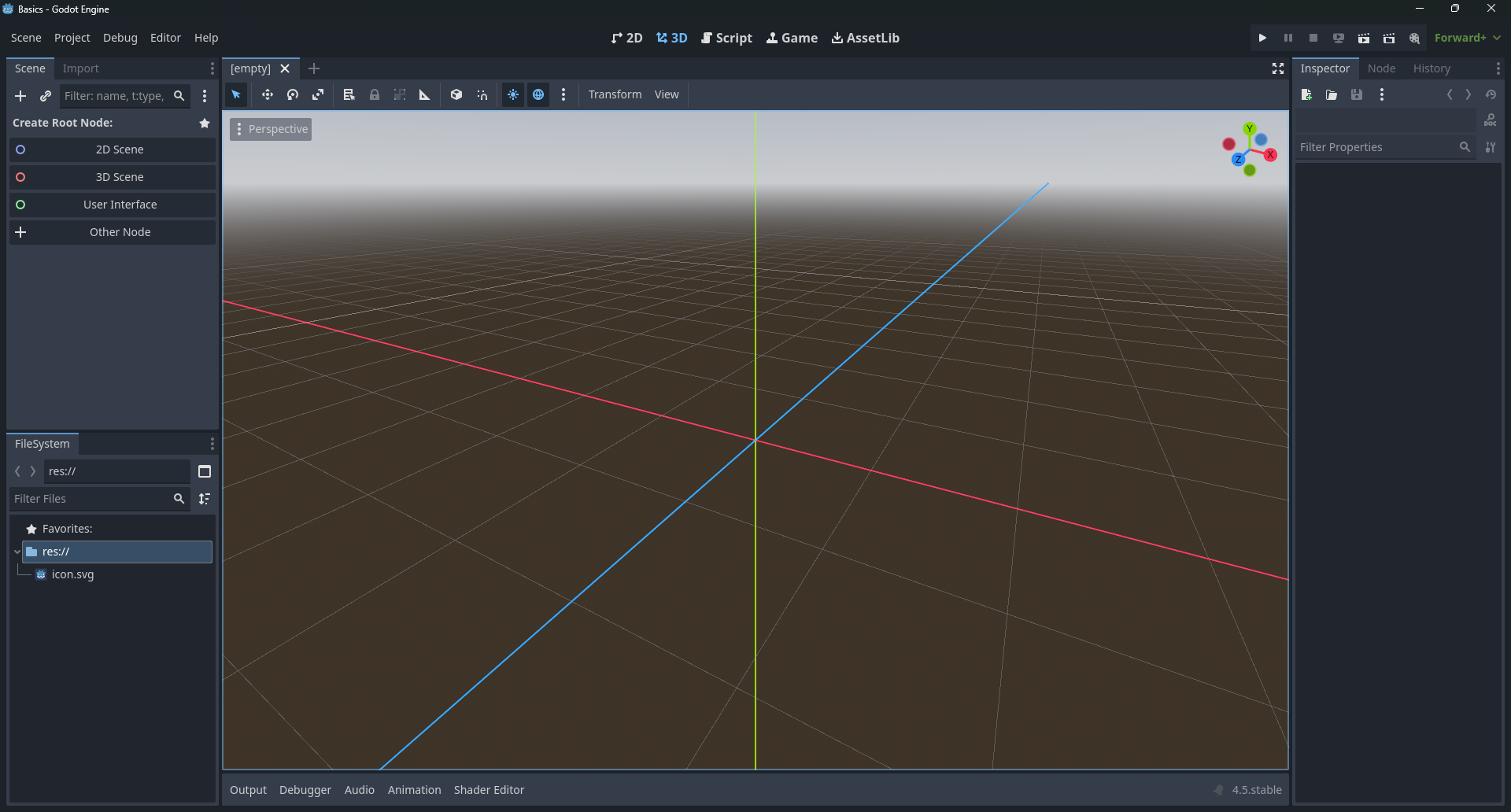
Wissenswerte Abschnitte
- SceneTree
- Filesystem
- 2D/3D Workspace
- Script Workspace
- Game Window
- Asset Lib
- Node Settings
- Inspector
Was ist eine "Node"?
-
Fast alles in Godot ist eine
Node - Pro Node nur ein Script
- Node
- Node3D
- Node2D
- Control (-> UI Elemente)
- Da nur ein Script pro Node, meist Komposition statt Vererbung
Beispiel Sprite2D
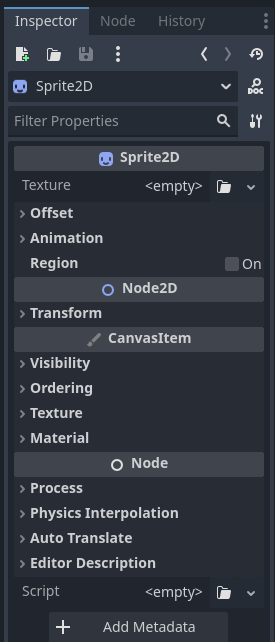
Sprite2D→Node2D→CanvasItem→Node
Was ist eine "Scene"?
- Jede Teilbaum von Nodes ist auch eine Scene
- Im SceneTree kann man jederzeit "Save Branch as Scene" klicken
Nodes mit Kollisionen
 StaticBody2D |
 StaticBody3D
- Funktion:
- Physics Body; Unbeweglich
- (Kann trotzdem bewegt werden, aber reagiert nicht auf Kollisionen)
- Anwendungen:
- Wände, Feste Hindernisse, Weltengrenzen
 CharacterBody2D |
 CharacterBody3D
- Funktion:
- Physics Body; Nur "manuell" bewegt
- Sprich: Muss durch eigenen Code bewegt werden
- Anwendungen:
- Charactere oder Objekte die nicht durch äußere Einflüsse beinflusst werden sollen
 RigidBody2D |
 RigidBody3D
"Rigid" (Starr) im gegensatz zu "Soft" (Weich) bodies!
- Funktion:
- Physics Body; Volle Physics Simulation
- Wird nicht direkt durch code bewegt, aber kann mit Kräften beeinflusst werden
- Anwendungen:
- "Normale" Physicsobjekte: Teile eines Kaputten Objektes, die "weggeschubst" werden können sollen
- zB. Pong Paddles, Tetris Blöcke, ...
 Area2D |
 Area3D
- Funktion:
- Collision Body; "Nur" für Kollisionen, keine Physics
- erkennt wenn es in andere Körper rein bewegt wird, aber hält nichts auf und ist quasi nur ein Sensor
- Anwendungen:
- Erkennung dass Physicsobjekte (oder andere Areas) in einem Bereich (sprich Areal) ist
- zB. Interagierbare Objekte für Charactere, Zonen die Einfluss nehmen (wind, feuer, gift, ...), ...
 CollisionShape2D |
 CollisionShape3D
- Funktion:
- Definiert die Kollision der Physics Objekte
- 2D Shapes:
- Circle, Square, Capsule, Worldboundary, Polygon, ...
- 3D Shapes:
- Sphere, Box, Capsule, Worldboundary, Mesh(/Polygon), ...
... und noch viele andere!
Godot Docs: Nodes
Signale
- Signale sind das Event-System von Godot
- Erlauben lose Kopplung zwischen Nodes
- Node A emittet ein Signal → Node B reagiert darauf
- Node A muss nichts von Node B wissen und stellt nur das Signal bereit
Beispiel: Button signal verbinden
func _ready():
    $Button.pressed.connect(_on_button_pressed)

func _on_button_pressed():
    print("Button wurde gedrückt!")
Im Editor
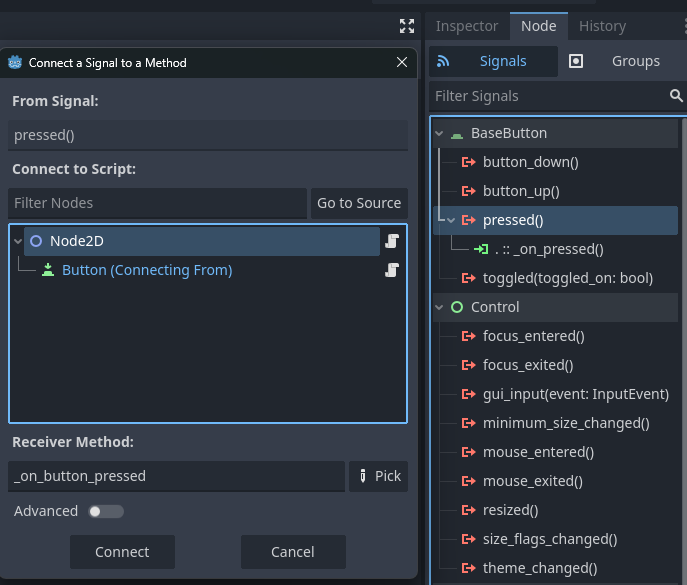
Man kann einfach eigene Signale erstellen:
signal my_signal()
signal damaged(amount: int)
GDScript
Konventionen, Funktionen und Tücken
GDScript == Python??
- GDScript nimmt starke Inspiration von Python
- Hat aber wichtige Unterschiede wie zB bei der Typisierung
- Python hat optionale Typisierung, aber ist nur ein Hinweis für Linter
- GDScript hat "echte" aber optionale Typisierung
- Es ist Empfehlenswert so viel zu Typisieren wie möglich zu machen
Typing
func _ready():
	var test1 = "cool text"
	test1 = 5
	print(test1) # Output "5"
	var test2 : String = "cool text"
	test2 = 5 # Fehler und bricht hier ab
	print(test2)

func myNum():
	return 5 # Geht, da keine Typisierung

func myName() -> String:
	return 5 # Fehler und bricht hier ab
Naming Conventions Godot Style Guide
| Type | Convention | Example |
| File names | snake_case | yaml_parser.gd |
| Class names | PascalCase | class_name YAMLParser |
| Node names | PascalCase | Camera3D, Player |
| Functions | snake_case | func load_level(): |
| Variables | snake_case | var particle_effect |
| Signals | snake_case | signal door_opened |
| Constants | CONSTANT_CASE | const MAX_SPEED = 200 |
| Enum names | PascalCase | enum Element |
| Enum members | CONSTANT_CASE | {EARTH, WATER, AIR, FIRE} |
Reihenfolge der Sprachelemente einer GDScript Datei
01. @tool, @icon, @static_unload
02. class_name
03. extends
04. ## doc comment

05. signals
06. enums
07. constants
08. static variables
09. @export variables
10. remaining regular variables
11. @onready variables

12. _static_init()
13. remaining static methods
14. overridden built-in virtual methods:
	1. _init()
	2. _enter_tree()
	3. _ready()
	4. _process()
	5. _physics_process()
	6. remaining virtual methods
15. overridden custom methods
16. remaining methods
17. subclasses
Game Loops
- Grundlage der meisten Game Engines ist eine Gameloop
- Oft aufgeteilt zwischen:
Per-Frame-CodePer-Phsyics-Step-Code- In Godot:
-
_process(delta): wird jedes Frame aufgerufen -
_physics_process(delta): wird bei jedem Physik Schritt aufgerufen -
deltaist hierbei jeweils die Zeit zum letzten Aufruf - Bei physics üblicherweise jedes mal gleich, da Konstante Zeitabstände genutzt werden
Nutzen der zwei Loops
_physics_process- Mehrfach in einem Physik Schritt Kollisionsobjekte zu bewegen bringt nichts → wird nur im Schritt abgeprüft
- Bei unterschiedlichen Rechnerleistungen verändert sich nicht die Ausführhäufigkeit
_process- Physikschritt sind oft einiges niedriger als FPS
- Physikunabhänige visuelle Sachen wie Animationen sollten jedes Frame aktualisiert werden
Warum delta?
"Why timers in Sierra games are so broken" - Space Quest Historian
Godot loop vergleich
            func _process(delta):
	position.x += 1
            func _physics_process(delta):
	position.x += 1
Godot loop mit delta
            func _process(delta):
	position.x += 60 * delta
            func _physics_process(delta):
	position.x += 60 * delta
Rechnung * delta
-
Da
deltadie Zeit seit letzten Durchlauf ist -
* deltaist in_physics_processca* 0.016 - Das sind 60 Schritte / 1 Sekunde
Start Funktionen
-
_init: Konstruktor der Node/Klasse (einmalig) -
_enter_tree: Wenn die Node in den Scene Tree eingehangen wird -
_ready: Wenn alle Child Nodes fertig initialisiert wurden (einmalig)
@tool
Toolscripts laufen im Editor, bentutzt wenn man Hilfen baut mit denen man den Entwicklungsprozess verbessert
@tool
func _process(delta):
	if Engine.is_editor_hint():
		rotation += PI * delta # rotiert im Editor im Uhrzeigersinn
	else:
		rotation -= PI * delta # rotiert im Spiel gegen den Uhrzeigersinn
Vorsicht: wenn man mit tool scripts den SceneTree verändert und das gespeichert wird ist das permanent
@export [var]
Exposed die Variable in den Inspector
Hilfreich bei Dingen die man pro Node im Editor einstellen will
Sind weiterhin normale Variablen
@onready [var]
Direkt vor _ready wird etwas gemacht (idR zuweisungen)
@onready var parent = get_parent()
var first_child

func _ready():
  first_child = get_child # gleicher effekt wie ein onready auf first_child
Hilft primär für kompakteren Code